Professional work · Real-time voice agent · Desktop app
AI Sales Caller
An AI agent that phones leads, talks in Egyptian Arabic or English, and writes the sales brief when it hangs up.
- LLM providers
- 4
- LLM providers
- source: app/llm_factory.py
- speech providers
- 3
- speech providers
- source: app/speech_factory.py
- call channels
- 4
- call channels
- source: app/transports.py, app/gsm_phone.py
- interface and installer
- EN/AR
- interface and installer
- source: static/i18n/ar.json, build/installer.iss
The problem
Qualifying leads by phone is slow and expensive, and in Egypt most leads prefer a call in Egyptian Arabic. Telephony providers that reach Egyptian numbers are limited, and sales teams are not technical.
My role
- Engineered the system: AI/LLM engineering, real-time voice pipeline, application development, campaign dashboard and Windows desktop packaging
Engineered during my role as AI & Software Engineer at Elenor Marketing Agency, Cairo (Jan 2026 – present). Screenshots come from sanitized demo environments: client and business data are replaced with demo data.
What it is
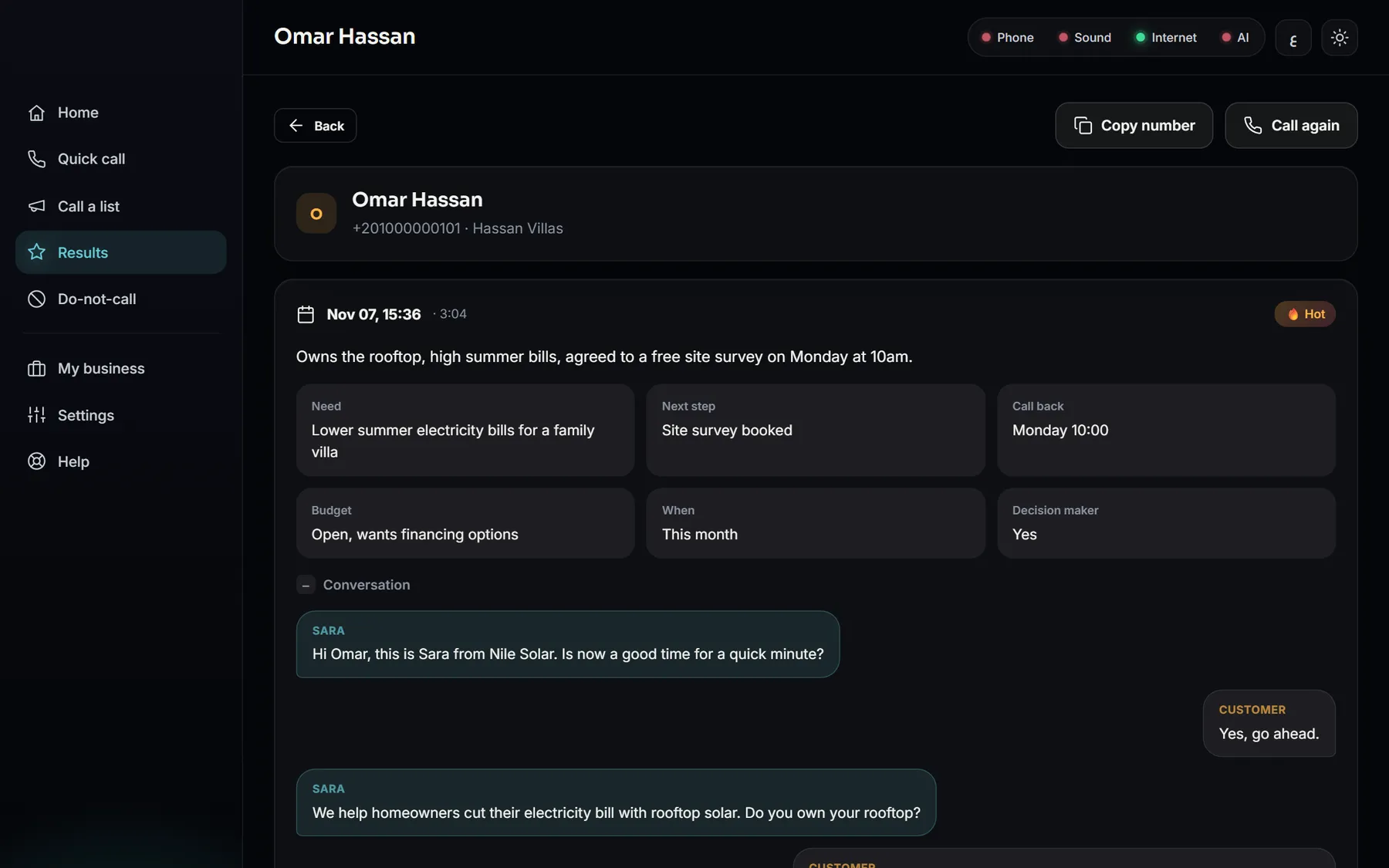
“Sara”, a voice agent, holds a real-time conversation over a browser call, a Telnyx or Twilio phone line, or the user’s own Android phone and SIM. After each call an LLM turns the transcript into a structured sales brief: interest level, need, budget, timeline, objections and next step. A campaign dashboard runs whole lead lists inside calling hours, with retries and a do-not-call list. It ships as a Windows desktop app with an Arabic and English installer.
Key features
- Streaming STT → LLM → TTS pipeline with voice activity detection and an end-call tool
- Swap the LLM (Gemini, OpenAI, Groq, Claude) and speech providers (Deepgram, Soniox, ElevenLabs) from settings
- Four call channels: browser WebRTC, Telnyx, Twilio, or an Android phone over ADB with an audio bridge
- Post-call JSON brief validated against a schema, saved to SQLite and CSV
- Campaigns: CSV/XLSX import with column mapping, Cairo calling hours, retries, concurrency
- Automatic do-not-call when a lead asks to be removed
- First-run setup wizard: phone pairing by QR code, sound devices, AI keys, voice, test call
- Desktop app: local-only server on a random port with a per-launch secret and a single-instance lock
Architecture
Channels
- Browser (WebRTC)
- Telnyx / Twilio
- Android phone (ADB)
Voice pipeline
- STT (streaming)
- LLM + tools
- TTS (streaming)
- VAD / turn-taking
After the call
- Transcript → LLM
- JSON-schema brief
- Lead status update
App
- FastAPI dashboard
- Campaign dialer
- SQLite + CSV
- Desktop shell
AIReal-time conversational agent with interruption handling and an end_call tool
AIStructured extraction: transcript → JSON-schema-validated sales brief
AIProvider-agnostic LLM and speech factories
Stack
Voice AI
LLMs
App
Telephony
Desktop
Engineering challenges
01
Calling Egypt without a carrier contract
Trial telephony could not reach Egyptian numbers, so the app can dial through the user’s own Android phone over ADB, bridging call audio through a virtual or USB sound device.
02
Shipping AI to non-technical users
Everything a developer would edit in .env became a guided setup wizard. The FastAPI app is wrapped in a native window with a splash screen, a self-test mode and a bilingual installer, so a salesperson can install and run it.
03
Trustworthy outbound AI
The agent only states facts from the business profile, and a lead who asks to stop is added to the do-not-call list automatically. Every call ends in a structured, reviewable brief.
Screens
Captured from the real source code (FastAPI dashboard, and the desktop window rendered by the pywebview shell). No AI keys or phone line were connected, so live calling was not exercised. The three call results are demo records written to show the brief format.
Next project
Omnichannel AI Messaging Agent